Contributing
Kuwaiba is non-profit, open-source project, driven by Neotropic with strong community support. That’s why we need as many users as possible to get involved by contributing to the project. There are many ways to contribute, so it is possible for everybody to bring something positive to Kuwaiba, regardless of your skills or time availability:
Be a part of the community. Simply use Kuwaiba for your daily job and promote it to your colleagues and contractors. Join our chats, forums, help others to work effectively with Kuwaiba.
Participate in Kuwaiba’s development. Create an issue. Send Pull requests.
Document Kuwaiba’s processess. This includes - writing missing documentation chapters, improve existing ones and translate them to your language and much more.
Donate. We use donation money primarily to hire core developers so they can work full-time on the project.
Development
Documentation
We welcome any your support in documenting your Kuwaiba journey in order to share with other users, and we commit to retain the easy to use and helpful support to start documenting. Don’t hesitate to start writing even if the words github, restructured text and pull request are new for you. Nevertheless the actual working surrounding is quite comprehensive, we will try to make any small step easier and let you concentrate on the issue.
Contributing to Documenting Kuwaiba from scratch
If you prefer video for getting new information please start here:
Kuwaiba documentation is build on ReadTheDocs (RTD) platform. That means automatic documentation deployment with the Sphinx engine. To work with that platform you need git installed, github account and text editor, working with git. We prefer VS Code, so the following story will be in relation with this editor, but you can work with the one of your choice.
Tip
- If you are new with VS Code, see official videos, covering our needs:
Learn Visual Studio Code in 7min (Official Beginner Tutorial)
5 Tips for Note Taking with VS Code & Git
Pull Requests in VS Code
As far as RTD is using reStructuredText (RST) it is considered useful to install an extension reStructuredText by LeXtudio (RTL). Unfortunately the extension is now considered for experienced users, so we give you some breadcrumbs.
When you feel comfortable enough with VS Code, you might find useful the official Sphinx RST Tutorial or try this nice video course by chance available on youtube.
If you are getting better with RST check our rst snippets.
asd
Best practice in documenting
Terms
Use hover links to Ontology acronyms or glossary only once per page
Tip
:hoverxref:`RTD <rtd-acronym>`
Formatting
Avoid simple links - keep in mind that your link names will be translated then.
Error
Don’t:
`github account`_
.. _github account: https://github.com/signup
Tip
Do:
`github account <github_>`_
.. _github: https://github.com/signup
Make a direct link to
res/folder likeres/<path>Error
Don’t:
.. image:: ../res/start/login_page.png
Tip
Do:
.. image:: /res/start/login_page.png
Translating
Translation is organized with Weblate. Typical process is shown on the diagram below.
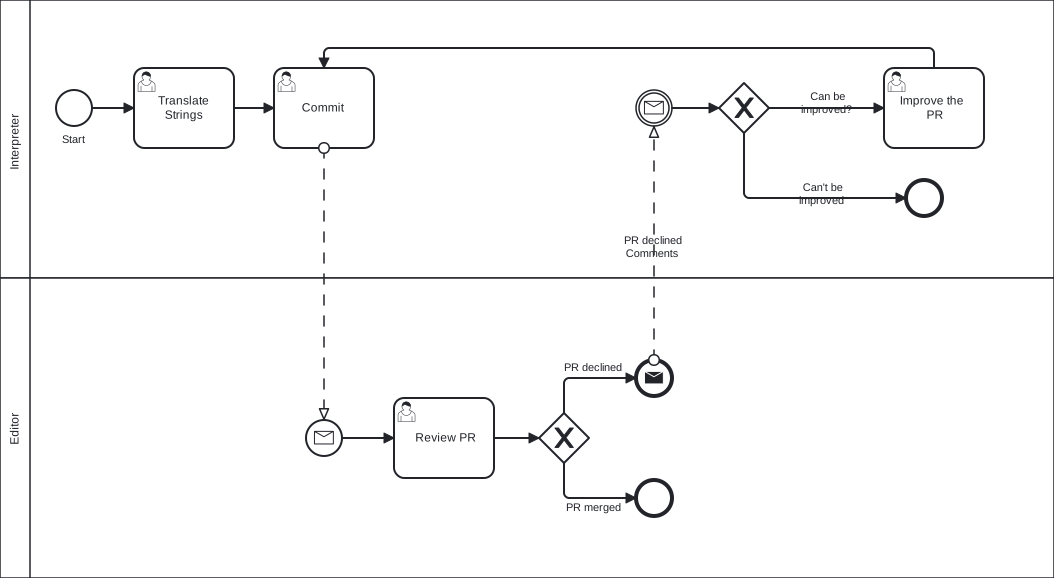
Translating BPMN flow